> ## Documentation Index
> Fetch the complete documentation index at: https://mania.bot/docs/llms.txt
> Use this file to discover all available pages before exploring further.
# FAQ
> Frequently asked questions about MANIA
## General
**Recommended minimum for MapleStory & MANIA**
* 4-core CPU
* 8GB RAM
* 250GB SSD
* USB 3.0 port *(for the Pico and any capture card HDMI output feeding)*
* HDMI out port *(for a capture card if you're going that route)*
The screen reading that MANIA does can be CPU intensive, so a decent CPU and a stable internet connection are necessary.
You can find secondhand desktops hitting these specs for **\$50 or less** on used marketplaces. If you'd rather something small, quiet, and new, a **mini PC with an AMD Ryzen 5 5500U or better** (\~\$400) works well. Better is better, but this works fine.
You can run one instance per license, you can upgrade at your [user dashboard](https://mania.bot/dashboard/account) by clicking on Change Plan under "Subscription"
With **Remote + Hardware Input**, only the MapleStory PC is tied up and your MANIA PC stays free. See [Capture](/capture) for a more in-depth view of your options.
The computer running MapleStory will always be occupied while MANIA runs.
Yes, but they are not officially supported. User experience is important to us, and a Virtual Machine is difficult to set up for less tech-savvy users; Due to the possibility of difficult and frustrating networking issues, it's not recommended and support will be limited. However, we are happy to try our best to assist you as long as you know this.
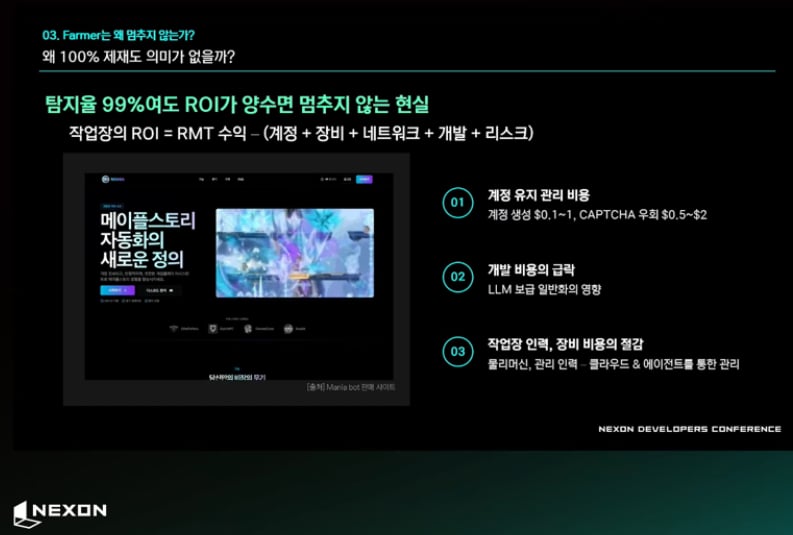
That is **only** for GMS, and the primary reason is that GMS uses a kernel-level anticheat that is impossible to hide from forever for **anybody**. While Nexon does try rather hard to target MANIA specifically as we are the most popular and feature-rich bot on the market (they even spoke about us at their own Nexon Developers Conference), instead of playing the cat and mouse game of repeatedly fixing detection, we devised a way around it instead.
We recommend this setup to **anyone** regardless of what bot they use for servers with kernel-level anticheat, but you may have heard this as a way to talk down on MANIA. You do have several options, however:
* **GeForce NOW:** Stream the game to you from NVIDIAs servers, this uses only one computer but requires a third-party subscription to GFN.
* **Virtual Machine** This is only recommended if you're particularly tech-savvy and have the hardware to spare, but this also requires only one PC.
* **Remote Desktop:** Utilize RDP software to remotely view a second PCs screen so MapleStory is on that PC, and MANIA stays separate.
* ⭐ **Capture Card & Pico/CP2102:** The workaround that MANIA pioneered to deal with GMS' rigorous detection, it also has the benefit of using real hardware input AND letting you use the MANIA PC while you bot!
**Follow-up Question:** **What if I want to play MapleStory on the PC that has MANIA on it?**
Restart your PC before opening MapleStory and you're good to go!
 ## Setup & Troubleshooting
Try disabling **XMP** in your BIOS RAM settings and make sure MANIA is excluded from Windows Security. See [Setup](/setup) for details.
There's an issue with your input, try the following in order
* Try moving the hotkey to something else, it may be getting grabbed by your Operating System.
* Run MANIA as an Administrator **Right-click → Run as administrator**.
See the [capture documentation](/capture) for setup instructions and troubleshooting.
Cursor desync can happen on GeForce Now. **Alt+tab** out of the game to check if your Windows cursor aligns with the in-game one. To realign, move your cursor out of the game and slowly back into the frame.
Hover over the **(?)** icons next to each setting for explanations of what they do.
## Gameplay & Routines
Cooldowns are enforced by default. If your ability has no cooldown or you want to spam it, set the cooldown value to 0. See [Skills](/keybinds#skills) for more details.
Auto move only uses skills for vertical movement. Climbing ladders can be handled with manual commands. Assign `Up` to a skill, set a point at the base of the ladder slightly off to the side, cast `Up` with `direction`, `jumps=1`, and `hold`.
1. In MapleStory, set Chaos Lock to `ctrl` and Concussion to `alt`
2. In Keybinds, create a skill for Boundless and another skill bound to `ralt`
3. In Routine Editor, set a point with max radius
4. Add **Command → Skills → Boundless**
5. Add **Command → Skills → `ralt` skill** with `hold` parameter
6. Add random attacks and additional points with probability for variance
7. Full routine duration should be around the same as the cooldown of Boundless
## Setup & Troubleshooting
Try disabling **XMP** in your BIOS RAM settings and make sure MANIA is excluded from Windows Security. See [Setup](/setup) for details.
There's an issue with your input, try the following in order
* Try moving the hotkey to something else, it may be getting grabbed by your Operating System.
* Run MANIA as an Administrator **Right-click → Run as administrator**.
See the [capture documentation](/capture) for setup instructions and troubleshooting.
Cursor desync can happen on GeForce Now. **Alt+tab** out of the game to check if your Windows cursor aligns with the in-game one. To realign, move your cursor out of the game and slowly back into the frame.
Hover over the **(?)** icons next to each setting for explanations of what they do.
## Gameplay & Routines
Cooldowns are enforced by default. If your ability has no cooldown or you want to spam it, set the cooldown value to 0. See [Skills](/keybinds#skills) for more details.
Auto move only uses skills for vertical movement. Climbing ladders can be handled with manual commands. Assign `Up` to a skill, set a point at the base of the ladder slightly off to the side, cast `Up` with `direction`, `jumps=1`, and `hold`.
1. In MapleStory, set Chaos Lock to `ctrl` and Concussion to `alt`
2. In Keybinds, create a skill for Boundless and another skill bound to `ralt`
3. In Routine Editor, set a point with max radius
4. Add **Command → Skills → Boundless**
5. Add **Command → Skills → `ralt` skill** with `hold` parameter
6. Add random attacks and additional points with probability for variance
7. Full routine duration should be around the same as the cooldown of Boundless